
Many of my clients work in industries where they have beautiful images of their work. Whether it’s wedding professionals, interior designers, or any other creative business, it’s important to showcase those visuals strategically on your website. But choosing between a website portfolio and gallery for showcasing creative or event-based professional work can be a difficult task.
Let me first start by putting you at ease: there’s no right or wrong way to display your work. However, after years of working on websites, I’ve developed some insight that might help you decide whether a portfolio or a gallery is the right solution for you and your prospective clients. Every business is different, but this guide will help you understand the differences between website portfolios and galleries, and land confidently on which option would best showcase the images or videos that show off your work.
Showcasing Your Work in a Website Portfolio or Gallery
Before you can make a decision on whether a portfolio or gallery is best for your website, let’s start with an explanation of what the difference is between the two. In simplest terms, a gallery is one main collection of images that can be scrolled through to view a body of work. A portfolio, on the other hand, is often a collection of specific projects or galleries to show off individual projects or styles.
Website Portfolio vs. Gallery
You may hear the terms “website portfolio” and “website gallery” thrown around interchangeably, but there’s actually a difference between the two from a website design perspective.
Showcasing your work in a website gallery
A gallery is a curated assortment of images that appear on one page—typically displayed in a masonry or refined grid system. When viewing a website gallery, visitors can click on an image to enlarge it, but most times they peruse the album by scrolling through the entire collection of images to get a feel for the work you’ve produced.

The pros of showing off your work in a gallery
We all know that time is everything—and your leads don’t want to be scrolling through a hundred photos to get a feel for what you’re capable of. But if it’s a perfectly curated assortment of images? Well, then they may just fall in love.
This display method removes the need to click into a new page and then back and forth repetitively. It showcases your style and talent from a high bird’s-eye view.
The cons of showing off your work in a gallery
It’s really easy for a gallery to become busy and cluttered if the collection of images isn’t curated carefully. When there are various colors, styles, and talents being showcased all on one page, you must be sure to take a step back and look at the whole.
Have you ever seen one of those Instagram pages with a thousand different colors and random fonts (like what’s even happening?!). There’s no way I’m letting your website look like that! If you chose to show your work off in a gallery when we work together, I’ll help make sure the images shown are the best representation of your work and portrayed in a way that captures your lead’s attention without overwhelming them with visuals.
Now that we’ve talked about website galleries, let’s talk about another option you have for using visuals to show off your work on your website.
Showcasing your work in a portfolio
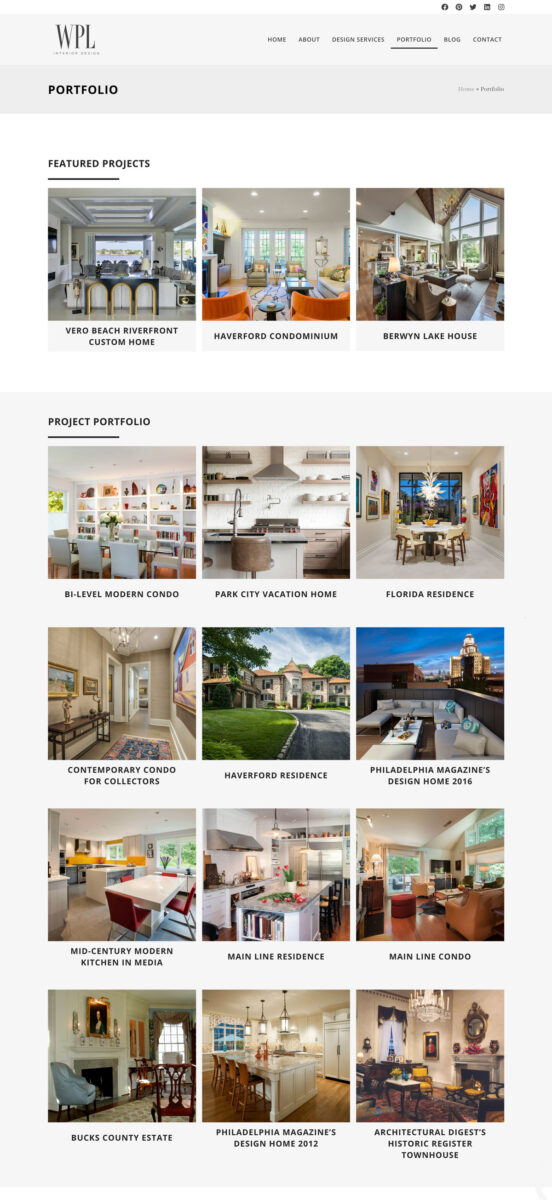
A portfolio is a website page that allows you to group your images into different collections. The main portfolio page then showcases all of the collections that a visitor could choose to further explore.
Portfolios may require a bit more work to create and manage, but they are often the best choice when you have a vast collection of work to show off or if you have different categories of images that are important to show a distinction between.
The pros of showing off your work in a portfolio
Let’s use an interior designer as an example here. If a design firm chose a gallery to show past projects, website visitors would be scrolling through an immense amount of images of different homes—and different spaces in or outside of the home! Because all homes have different styles, the change in projects would be jarring and the curation would look disorganized.
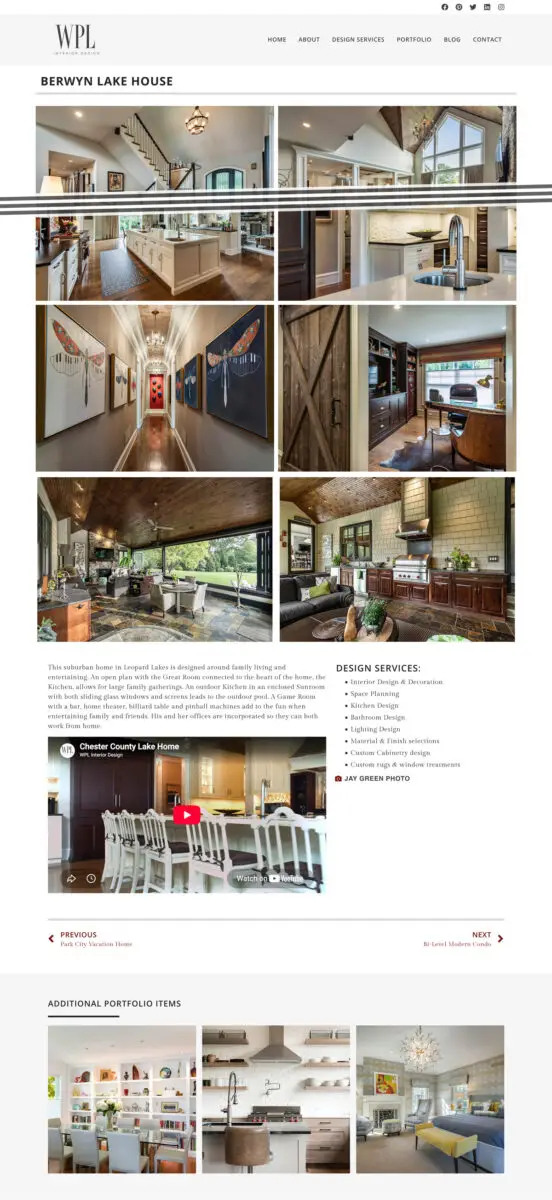
A website portfolio allows the interior designer to categorize their image collections into individual galleries for each of the projects they work on. When leads come to their website to review past work, the main portfolio page would give a sneak peek of past projects, and they could click into any project that caught their eye to see the full collection of images just for that one project.
An additional feature to using a website portfolio with individual collections is that you can share extra information on the single project you’re highlighting. An interior designer might link to other vendors they worked with on the project or provide a description of the redesign from start to finish to more thoroughly explain what the pictures are showing.
This provides a cohesive way to see a whole body of work, or an entire catalog of a particular skillset. The best way to organize your portfolio is to truly think of your customer and think of your sales consultations: what collections of images would you want to have handy for different calls and different scenarios.
The cons of showing off your work in a portfolio
The only real downside to website portfolios is that there are more pages to create for each collection you’d like to highlight—but that’s what I’m here for!
Additionally, by categorizing the work in collections, your website viewers will need to navigate a bit more to see additional examples of your work. For most leads, a surplus of examples is a good thing, though it is important to point out that they will be doing more clicking into a collection and back out of it again.
Website portfolios or galleries: The choice is yours!
Choosing between a website portfolio and gallery for showcasing creative or event-based professional work is honestly up to each individual business owner that I work with. There are honest pros and cons to both approach.
While I believe portfolios are the clear choice for strategically showcasing your work the majority of the time, you have to do what makes sense for your business, and deliver the content in a way that your visitors want! And, if it makes you feel any better, this isn’t a decision you have to make alone. I can talk you through portfolio vs. gallery options and help you make the right choice for your website.
Ready to share your stunning photos and attract more right-fit clients?
Let’s have a strategy session to see how you can use portfolios to help your photos work for you! Click here to book a call with us.
Enjoy this post? Pin it for later…
For help pinning these graphics – here’s a helpful link!